3D design. Detailed orders.

See your job in 3D.
Build the right order.

Design the room in 3D, then turn it into a clear, detailed order. Bring cabinet dimensions, materials and pricing together.

Explore the tools with your own shop. No payment collected at signup.

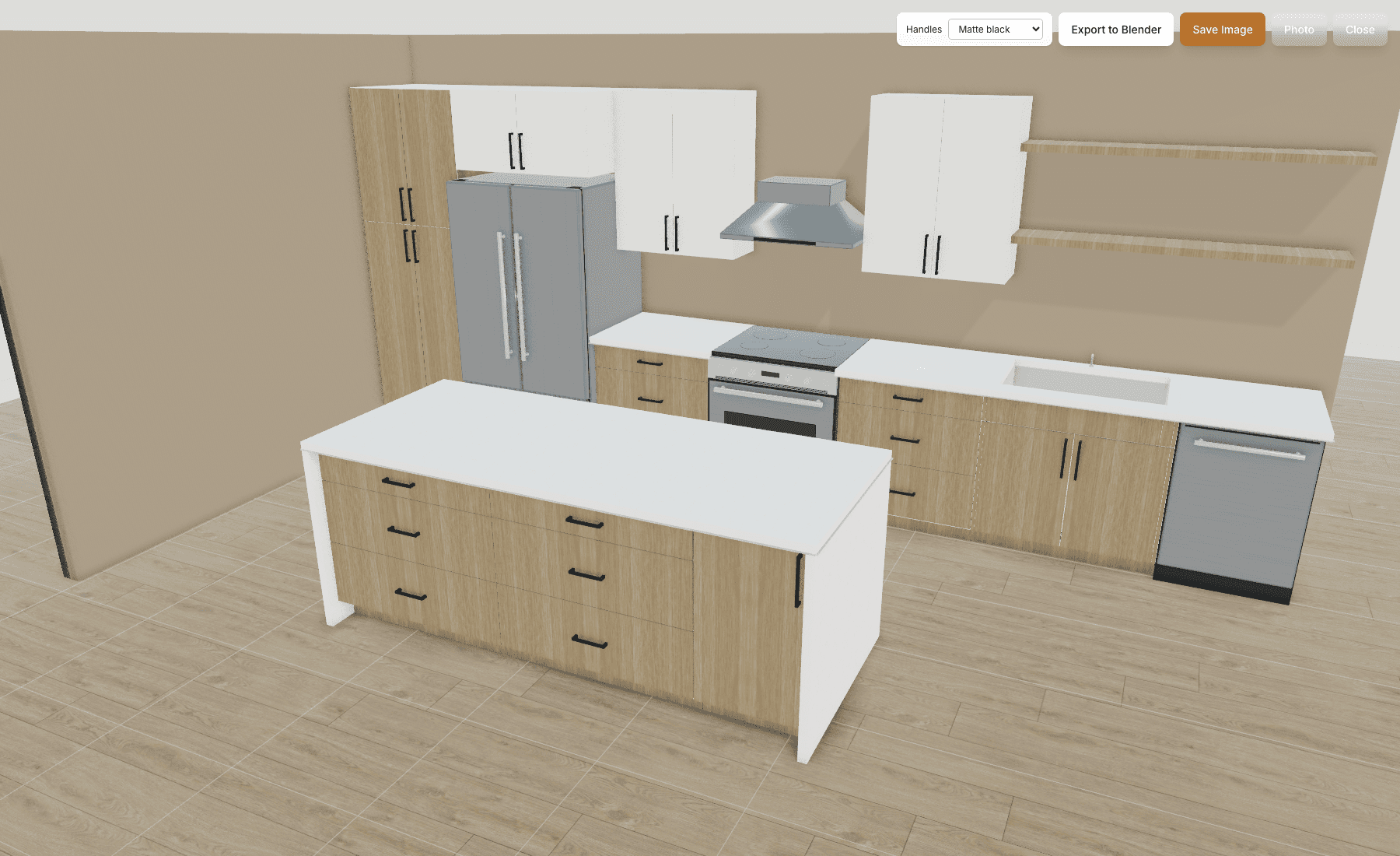
3D job view

The whole room, before the first cut.

CABINETSTACK / 3D JOB VIEWView full size
CabinetStack 3D view of a complete sample kitchen with oak base and tall cabinets, white upper cabinets and black handles

Plan the layout

Place cabinets and work through the room in 2D.

See it together

Review cabinets, materials and the full room in 3D.

Bring it into the order

Turn the design into a bid and review the cabinet details.

Captured in CabinetStack. A sample kitchen, shown in the actual 3D workspace.

The order sheet

A clear picture.
An equally clear order.

Bring the cabinet specification and the selling price together. Review the details in the order workspace, then prepare an organized sheet for the job.

01 /

The cabinet details

Keep quantities, dimensions, materials and selected build options together, grouped by room and product.

02 /

The numbers behind the order

Review unit prices, line totals and the overall order total, with tax and shipping shown where applicable.

03 /

The paperwork for the job

Print the priced order sheet and a separate packing list with dimensions, build specifications and checkboxes for made and loaded items.

Open sample order sheet PDF (opens in a new tab)

Explore the actual document from this sample kitchen.

CABINETSTACK / ORDER SHEETView full size
Preview of a CabinetStack order sheet with cabinet quantities, build specifications, dimensions, unit prices and line totals

Order sheet preview. Open the full-size image or PDF to review every line and the totals.

Sample cabinet and millwork order. Owner-supplied appliances shown in the 3D view are excluded from this order.

Keep the job moving

From the customer conversation to the shop floor.

01 /

Design & sell

Plan the layout, review the whole job in 3D and prepare the cabinet order with dimensions, options and selling prices.

02 /

Prepare the shop

Keep materials and hardware costs together. Review the bill of materials and prepare parts for production.

03 /

Track the work

Put the job in front of the crew. See active work, capture blockers and connect recorded labor to job costs.

CABINETSTACK / COMPONENT COSTSView full size
CabinetStack shared component cost catalog with organized materials and unit purchase costs

Know what goes into the cabinet

Your material costs.
One organized home.

Sheet goods, edgebanding, hardware and drawer slides belong together. Keep unit purchase costs current and put them to work in manufacturing estimates.

  • Update a component or preview a supplier list before import.
  • Export a clean CSV or share a polished PDF cost catalog.
  • Control purchase costs and customer selling prices separately.

Made for the people doing the work

Scan the job.
Get to work.

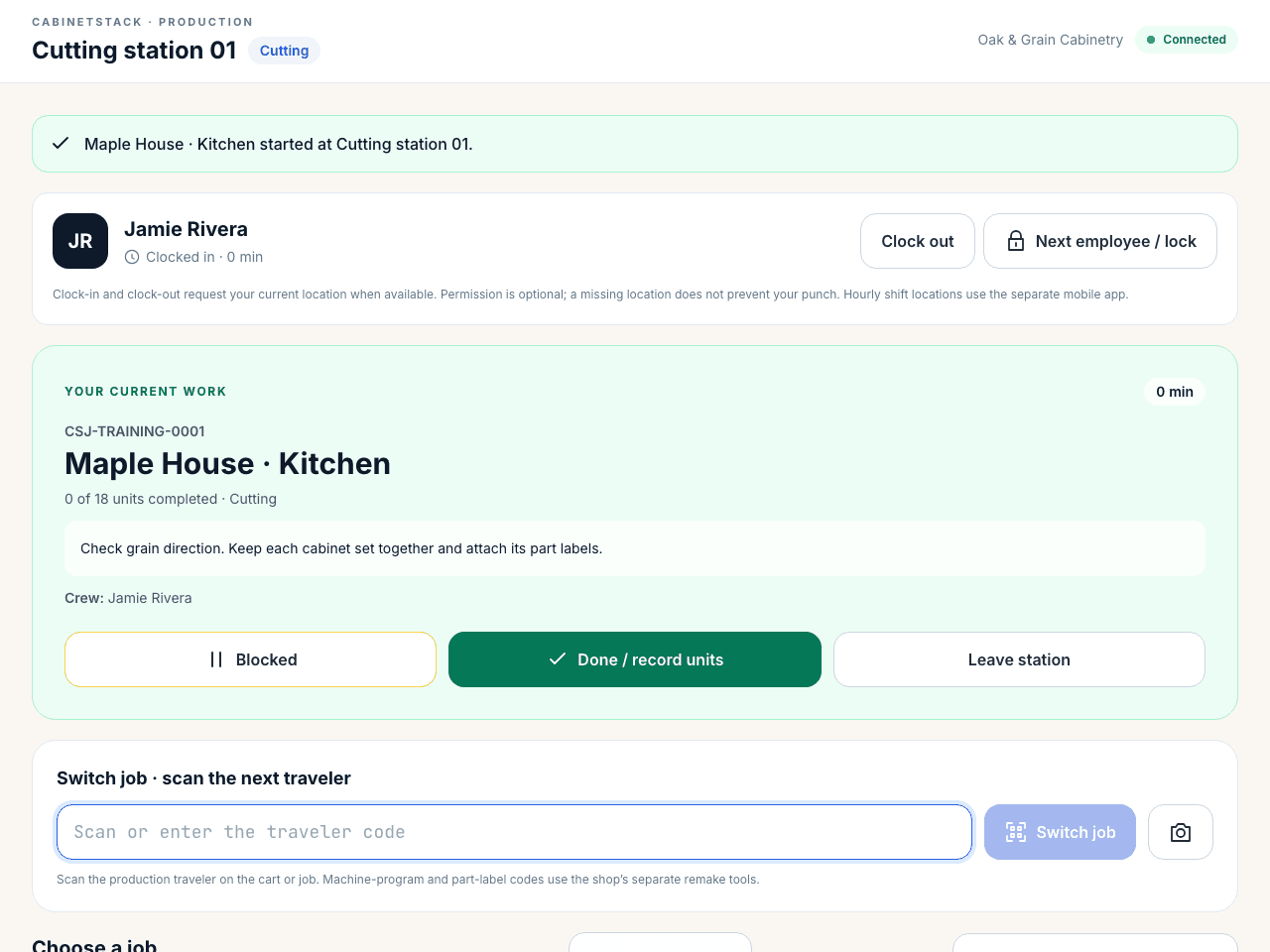
A station screen gives the crew large, straightforward controls. Managers can follow progress and review recorded labor without putting administrative screens on the floor.

  • Sign in with an employee badge and PIN, then scan a job traveler.
  • Join a crew, switch work, flag a blocker and record completed quantities.
  • Share batch labor across jobs with explicit allocation weights.
CABINETSTACK / SHOP FLOOR STATIONView full size
CabinetStack production station with employee job controls and a ready job queue

Launch pricing

Choose the tools your shop needs.

A plan for the way you work, priced per shop. Start with an evaluation workspace and confirm paid activation separately.

Annual: 2 months saved

Design & Sell

For cabinet businesses turning designs into customer orders.

$149/ shop / month

Monthly option · USD

Create evaluation workspace
  • 2D layouts and 3D cabinet design
  • Configurable product catalog and selling prices
  • Customer storefront and design access
  • Bids, orders and proposal documents
  • Customer accounts and project organization

Workshop

Shop essentials

For shops preparing parts and managing manufacturing costs.

$299/ shop / month

Monthly option · USD

Create evaluation workspace
  • Everything in Design & Sell
  • Shared component costs with CSV import and PDF export
  • Bill of materials and manufacturing estimates
  • Panel optimization and supported machine exports
  • Materials, hardware and machine setup
  • Part remake reporting

Production

For shops connecting employee work to job labor cost.

$499/ shop / month

Monthly option · USD

Create evaluation workspace
  • Everything in Workshop
  • Station tablets, employee badges and job travelers
  • Job switching, crew work and weighted batches
  • Employee time clock and labor cost rates
  • Job costs, blockers and time reconciliation
  • Employee and station access without per-seat charges

Launch prices are per shop, with no employee or station-tablet seat fee. Creating a workspace records your plan preference and begins evaluation access; it does not start paid billing. Read the pricing policy.

Before you get started

A few practical answers.

What happens when I create a workspace?

You create an evaluation workspace for your company. No payment is collected and no paid subscription starts. Your chosen plan records your preference; evaluation access may include tools from other plans. Paid access and billing terms are confirmed before activation.

Can I bring in my material costs?

Yes. The component cost catalog includes a CSV template, import preview and validation. You can review changes before applying them, edit costs individually and export a CSV or PDF catalog.

Do employees need an administrator account?

Production stations are paired to your shop and an operation. Employees use their badge and PIN to clock in and work on jobs through the station screen, without access to purchasing costs or wages.

Will it work with my machines?

CabinetStack includes panel optimization and supported machine export formats. Use your evaluation workspace to check your materials, machine configuration and sample output with your shop before relying on a production workflow.

Put your shop in the picture.

Start with a workspace, bring in your costs and explore a project from design through production.

Create evaluation workspace